How to choose an SMS sender ID (header)
Your sender ID is the name your customer sees in place of a phone number. Here is how to pick one that is recognisable, gets approved on the DLT portal first time, and carries the right category suffix under the 2025 rules.
What is an SMS sender ID?
An SMS sender ID, also called a header, is the short name that appears in place of a mobile number when your message lands. Instead of a random number, the customer sees something like MYSHOP or AD-HORIZN, so they know at a glance who the message is from.
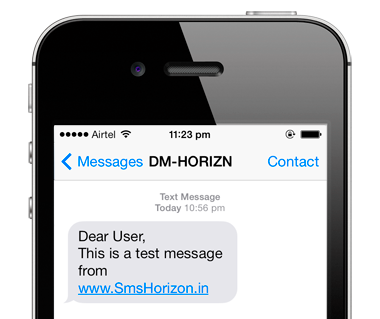
A good header builds trust and open rates. A poor or generic one gets ignored, and a non-compliant one is rejected at registration. Here is how to get it right.
The format rules
- Exactly 6 characters for commercial (A2P) SMS in India.
- Letters only for the header itself (alphabetic), shown in capitals by convention, for example MYSHOP.
- No spaces and no special symbols inside the 6 characters.
- It must be registered on the DLT portal before it can send, tied to your registered business (Principal Entity).
Pick a header that works
Choose something a customer instantly ties to your brand:
- Match your brand: use your brand name or a clear short form of it, not an unrelated word.
- Stay consistent: use the same header across all your messaging so customers learn to recognise it.
- Keep it readable: a header people can read and remember beats a cryptic abbreviation.
Categories and the new -P / -S / -T / -G suffixes
Every header is registered under a category, and from 6 May 2025 TRAI requires the category to show as a suffix on the header:
- -P for promotional (offers, marketing)
- -S for service (account and order updates)
- -T for transactional (OTPs, banking)
- -G for government
A header is tied to its category. You cannot send a promotional offer from a transactional (-T) header, or an OTP from a promotional (-P) header. If you send across categories, register a separate header for each.
Common reasons a header is rejected
- Not 6 characters, or contains spaces or symbols.
- Generic or misleading word that does not match your registered brand.
- Requested under the wrong category for how you intend to use it.
- Business entity not yet approved on DLT, so the header has nothing to attach to.
We register it for you, free
When you sign up with SmsHorizon, our team helps you pick a header, choose the right category and suffix, and register it on the DLT portal, at no cost. See the full DLT registration guide and learn the difference between promotional and transactional SMS so you register the right category from the start. You can send promotional and transactional traffic through your promotional and transactional routes once your header is live.
Choosing a sender ID, common questions
What is an SMS sender ID?
How many characters can an SMS sender ID have?
Can I use my brand name as the sender ID?
Why must a sender ID be registered on DLT?
What are the -P, -S, -T and -G suffixes?
Can I use the same sender ID for promotional and transactional SMS?
Related guides

Try it free before you pay
Get 500 free SMS credits and send your first message in under 2 minutes. No credit card required.
Questions? Contact us
Talk to a real human, no bots.